
windows mobile access point setting 2.4ghz vs 5ghz ?

The difference between 2.4 GHz and 5 GHz WiFi :
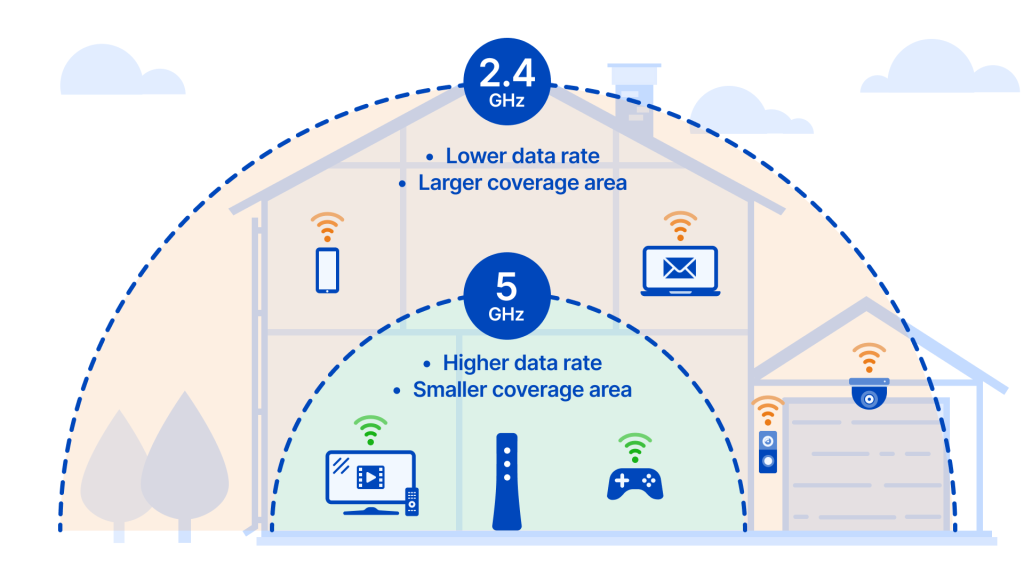
- The difference between 2.4 GHz and 5 GHz WiFi comes down to speed (internet hızı) and range (internet paylaştığı alan çemberinin genişliği).
- 2.4 GHz :
- + Larger coverage area (DAHA GENİŞ İNTERNET PAYLAŞIM ALANI ÇEMBERİ GENİŞLİĞİ)
- + better at penetrating solid objects
- – Lower data rate
- – more prone to interference (İNTERNET KESİNTİSİNE / FREKANSTA PARAZİTLENİME DAHA MEYİLLİDİR)
- – usually more devices using this frequency (PAYLAŞIM ALANI ÇEMBERİ GENİŞLİĞİ DAHA FAZLA OLDUĞU İÇİN, 2.4 GHZ FREKANSLI İNTERNETİ KULLANAN CİHAZ SAYISI HALİYLE DAHA FAZLA OLACAKTIR.)
- 5 GHz :
- + Higher data rate (DAHA YÜKSEK VERİ HIZI)
- + less prone to interference (İNTERNET BAĞLANTI KESİNTİSİ DAHA AZ OLUR.)
- + usually fewer devices using this frequency
- +/- Smaller coverage area (except 802.11ac)
- – worse at penetrating solid objects
SONUÇ :
- ÖNERİLER / SUGGESTIONS :
- Use 5 GHz for a device closer to the router
- If you’re able to use most of your devices near your router, 5 GHz is your best choice to take advantage of higher speeds. Similarly, if you’re doing a lot of high-bandwidth activities online, such as gaming or videoconferencing, it’s best to use this frequency and move as close as possible to the router. (Better yet, plug directly into the modem with an Ethernet cable, as a wired connection is always more stable and faster than wireless.) Or if, as stated above, you’re in an apartment or condo with many other units surrounding you, 5 GHz will help you avoid wireless congestion.
- Use 2.4 GHz for a device farther from the router
- On the other hand, on a device that moves around a lot throughout the day (like your smartphone), especially if you have a large home, the 2.4 GHz frequency is your best bet. This wavelength has a longer range and can penetrate solid objects more easily than the 5 GHz band, making it ideal for devices that are taken from room to room or are more distant from the router. The exception to this is newer routers running 5 GHz 802.11ac WiFi, which can, in the right conditions, get range coverage equal to 2.4 GHz.
- Use 5 GHz for a device closer to the router
INFORMATION SOURCE OF THIS PAGE:
802.11n vs 802.11ac vs 802.11ax
wifiler:
- TECHNOLOGY OF 2007 == n = 802.11n was turned into Wi-Fi 4
- TECHNOLOGY OF 2013 == ac = 802.11ac was renamed to Wi-Fi 5
- TECHNOLOGY OF 2019 == ax = 802.11ax has been named Wi-Fi 6 since its launch
- 802.11ax, also known as WiFi 6, is the next-gen WiFi standard.
- Each new standard comes with improvements in speed and efficiency made over time.
s